Google explains the differences between its three Nano Banana image generation models

Key Points
- Google has broken down the three models in the Nano Banana family in a detailed guide.
- Nano Banana 2 (Gemini 3.1 Flash Image), which delivers roughly 95 percent of the capabilities of the pricier Nano Banana Pro, should be the go-to choice for most projects.
- NB2's standout feature is image grounding: the model can search the web for specific images to understand what real-world objects—like particular buildings or animal species—actually look like before generating them.
Google has published an official guide for its Nano Banana image generation models, breaking down the differences between all three and explaining when to use each one.
Google has laid out the capabilities of its Nano Banana models in a detailed guide, with a focus on the recently released Nano Banana 2, which is based on Gemini 3.1 Flash Image. With three models now in the family, the guide helps developers and creatives figure out which one fits their use case.
NB2 handles most use cases at a fraction of Pro's cost
Google says Nano Banana 2 delivers about 95 percent of the capabilities of the pricier Nano Banana Pro, but at a significantly lower price point. That makes NB2 the recommended default for most new projects.
| Resolution | Nano Banana 2 (Gemini 3.1 Flash) | Nano Banana Pro (Gemini 3 Pro) |
|---|---|---|
| 0,5K | 0.045 USD | - |
| 1K | 0.067 USD | 0.134 USD |
| 2K | 0.101 USD | 0.134 USD |
| 4K | 0.151 USD | 0.240 USD |
The Pro model only makes sense for highly complex, multi-layered prompts or extreme logical requirements where NB2 falls short. That said, Google's wording makes clear that Nano Banana Pro is still the best image model in the lineup.
The older Nano Banana 1 is still the cheapest and fastest option since it isn't a thinking model, but Google doesn't really recommend it for new projects anymore. There's been no forced migration so far, so existing workflows keep running fine. If you're building new pipelines and need more nuance, better prompt tracking, or the new grounding features, Google says just go with NB2. A useful detail: at 512-pixel resolution, NB2 costs about the same as NB1.
NB2 can search the web for reference images before generating output
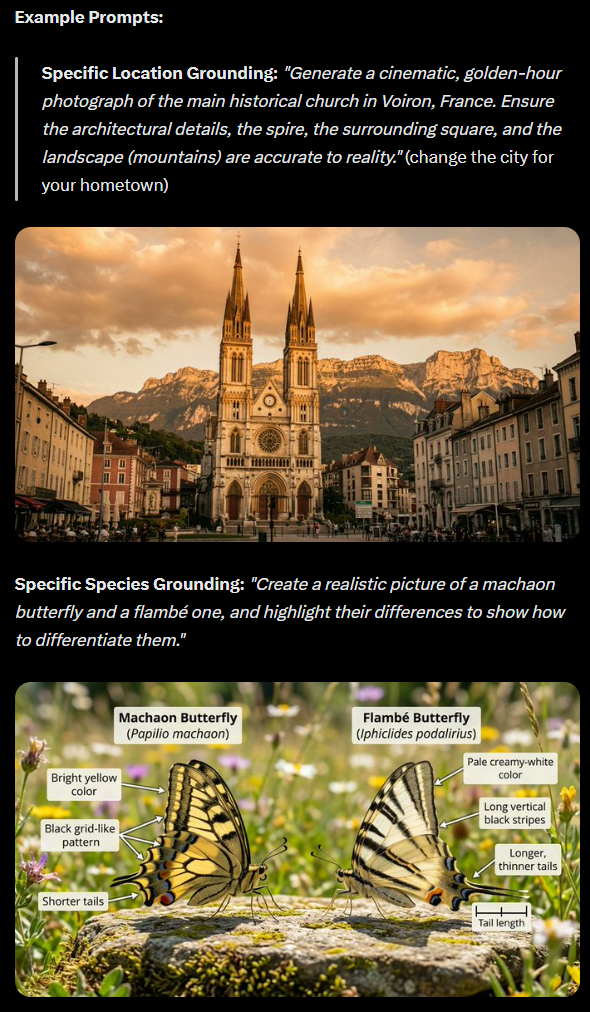
The exclusive new feature in Nano Banana 2 is visual grounding with Google Search. Nano Banana Pro could already pull textual information from the web, but NB2 goes a step further: it can now search the internet for actual images to understand what real objects look like before generating them.
Google says image grounding works especially well for specific locations like churches, bridges, or town squares, as well as exact animal and plant species. The guide demonstrates this with a church in Voiron, France, and the visual differences between two butterfly species. The image search does not work for people.
For now, the feature is only available through the API, not in the Gemini app. Developers can find implementation details in the documentation and in a Python colab from the official cookbook.
New resolution options and extreme aspect ratios cut costs and add flexibility
Nano Banana 2 can also generate images at 512-pixel resolution, which speeds up generation and brings costs down to Nano Banana 1 levels. Google recommends a multi-stage workflow: use the batch API, which comes with a 50 percent discount, to generate dozens of variants at 512px first, then scale the best composition up to 1K, 2K, or 4K.
NB2 also supports extreme aspect ratios of 1:8 and 1:4 in both vertical and horizontal orientation. Google says these formats work well for web banners, continuous scroll content, or comic layouts in Franco-Belgian style. The table below shows what each model can do.
| Feature | Nano Banana 2 (Gemini 3.1 Flash Image) | Nano Banana Pro (Gemini 3 Pro Image) |
|---|---|---|
| Max. Input tokens | 131.072 | 65.536 |
| Max. Output tokens | 32.768 | 32.768 |
| Resolutions | 0.5K (512px), 1K, 2K, 4K | 1K, 2K, 4K |
| Aspect ratios | 1:1, 3:2, 2:3, 3:4, 4:3, 4:5, 5:4, 9:16, 16:9, 21:9, 1:4, 4:1, 1:8, 8:1 | 1:1, 3:2, 2:3, 3:4, 4:3, 4:5, 5:4, 9:16, 16:9, 21:9 |
| Text grounding (web search) | Yes | Yes |
| Image grounding (image search) | Yes | No |
| Image inputs | Up to 14 reference images (PNG, JPEG, WebP, HEIC, HEIF) | Up to 14 reference images (PNG, JPEG, WebP, HEIC, HEIF) |
| Document inputs | Text and PDF (max. 50 MB via API, 7 MB via Console) | Text and PDF (max. 50 MB via API, 7 MB via Console) |
| Outputs | Text and images | Text and images |
| Knowledge base | Status January 2025 | Status January 2025 |
| Real-time web search | Yes | Yes |
| Security standards | C2PA content credentials, SynthID watermark | C2PA content credentials, SynthID watermark |
Google also recommends keeping Thinking Mode off by default for Nano Banana, since it mostly just adds time and compute cost during normal image generation, the company says. It's only worth turning on in three cases: when the model produces nonsensical results, when creating highly complex infographics, or when combining image grounding with spatial reasoning.
AI News Without the Hype – Curated by Humans
As a THE DECODER subscriber, you get ad-free reading, our weekly AI newsletter, the exclusive "AI Radar" Frontier Report 6× per year, access to comments, and our complete archive.
Subscribe now