How to turn off ChatGPT's default web search


OpenAI now includes web search in ChatGPT by default. When you type a query, ChatGPT decides on its own whether to search the internet.
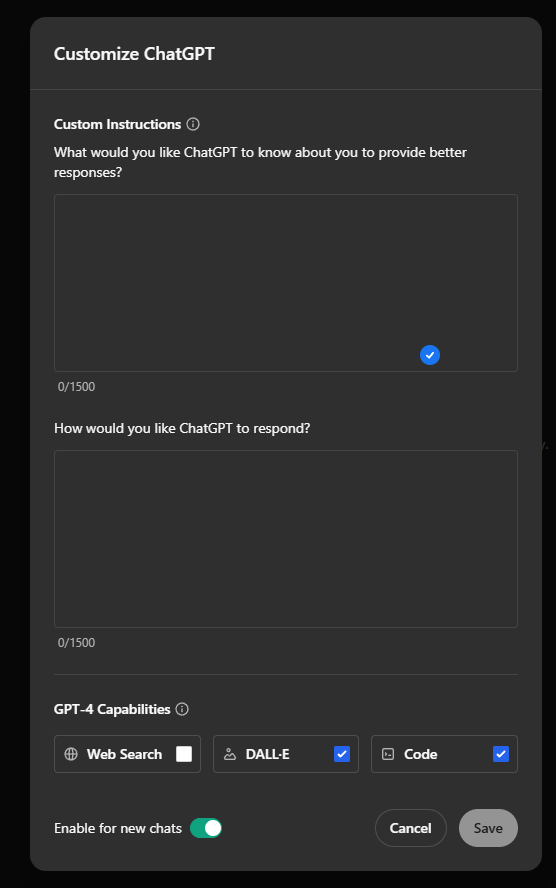
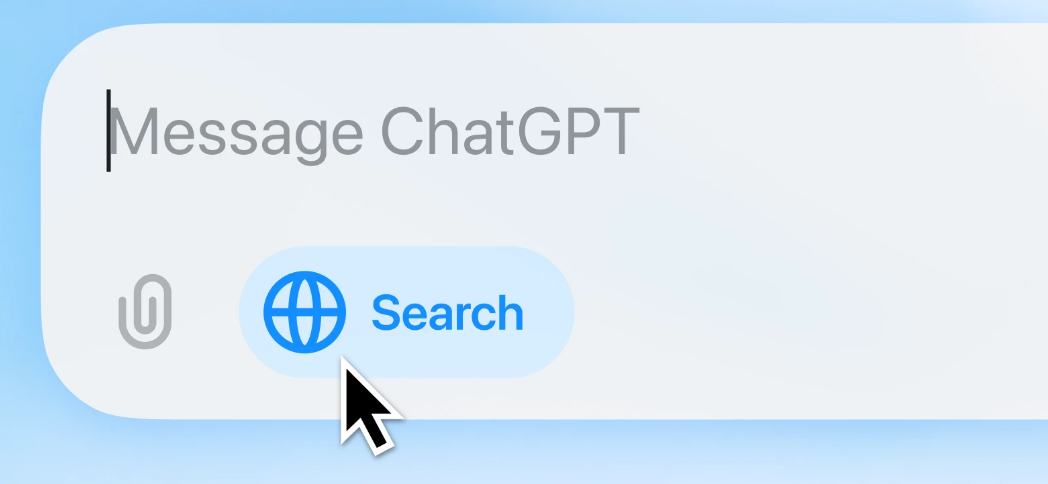
While you can force a web search using a small web button in the chat window, turning it off takes a few extra steps. If you want to stop seeing internet sources with your responses, here's how to disable web search:
1. Click your username in the top-right corner
2. Select "Customize ChatGPT"
3. Find "Web Search" under "GPT-4 Capabilities" in the bottom left
4. Toggle the setting off
Even with web search disabled in settings, you can still use it for specific queries by clicking the web button in chat. This gives you manual control over when ChatGPT searches the internet.
You can always turn the default web search back on through the same settings menu if you change your mind.
AI News Without the Hype – Curated by Humans
Subscribe to THE DECODER for ad-free reading, a weekly AI newsletter, our exclusive "AI Radar" frontier report six times a year, full archive access, and access to our comment section.
Subscribe nowAI news without the hype
Curated by humans.
- More than 16% discount.
- Read without distractions – no Google ads.
- Access to comments and community discussions.
- Weekly AI newsletter.
- 6 times a year: “AI Radar” – deep dives on key AI topics.
- Up to 25 % off on KI Pro online events.
- Access to our full ten-year archive.
- Get the latest AI news from The Decoder.